
If you’ve been searching for a clear, practical breakdown of linux kernel architecture explained, you’re likely trying to understand how the Linux kernel actually works beneath the surface — and how that knowledge impacts performance, gaming stability, and system optimization. This article is designed to cut through abstract theory and focus on what matters: how the kernel’s core components interact, how system calls flow, how memory and process management function, and why these details directly affect real-world performance.
We approach this topic with hands-on testing, kernel-level configuration experience, and analysis grounded in real-world Linux gaming and performance tuning scenarios. Instead of vague diagrams or overly academic definitions, you’ll get a structured, easy-to-follow explanation that connects architecture concepts to practical outcomes.
By the end, you’ll not only understand how the Linux kernel is structured, but also how to apply that understanding to optimize and troubleshoot your own system with confidence.
Why the Kernel Is Your Ultimate Gaming Co-Pilot
The kernel isn’t magic, but it can feel like a black box. In reality, it’s the core traffic controller for your CPU, memory, storage, and peripherals. Once you understand linux kernel architecture explained, you see the payoff: lower input lag, faster load times, smoother frame pacing. For example, smarter CPU scheduling keeps background tasks from stealing cycles mid-match (goodbye, random stutters). Meanwhile, optimized I/O handling speeds up asset streaming in massive open-world games. Some argue defaults are “good enough.” Sometimes, sure. But tuning your kernel means responsiveness gains you can feel.
The Core Blueprint: Deconstructing the Monolithic Kernel
What Is a Monolithic Kernel?
A monolithic kernel is exactly what it sounds like: one large, unified program that contains all core operating system services in a single space. Process control, memory handling, file systems, drivers—they all live together. Think of it like the Avengers operating out of one tower instead of splitting into separate teams across the globe.
This contrasts with a microkernel, where only minimal services run in the core and everything else operates in user space. Microkernel fans argue this design improves stability and security. They’re not wrong—isolating components can reduce system-wide crashes. But monolithic kernels counter with performance. Fewer context switches mean less overhead, which matters when you’re chasing frames per second.
Process Management & Scheduling
The kernel acts as a traffic cop for your CPU. Your game, Discord, music player, and background updates all compete for time. The scheduler decides who goes next.
Modern schedulers like EEVDF (Earliest Eligible Virtual Deadline First) aim for fairness and low latency. In gaming terms, that means fewer sudden stutters mid-fight. Instead of one task hogging the spotlight like a diva at karaoke night, EEVDF balances execution so gameplay feels smooth.
Memory Management
If the scheduler is traffic control, memory management is the librarian. It allocates RAM to textures, shaders, and system tasks while keeping everything organized.
Virtual Memory allows applications to use more memory than physically available by mapping addresses intelligently. Crucially, it prevents a crashing game from taking the entire system down (we’ve all had that one mod go rogue).
Virtual File System (VFS)
The Virtual File System (VFS) acts as a universal translator. Whether your game assets sit on EXT4, BTRFS, or NTFS, the VFS provides a consistent interface. That simplifies compatibility and avoids storage-specific headaches.
Device Drivers
Drivers are the bridge to your GPU, mouse, and keyboard. This layer directly impacts frame rates and input latency. When drivers are optimized, performance gains feel immediate—like switching from VHS to 4K overnight.
Networking Stack
Finally, the networking stack manages data packets for online gaming. It affects ping, packet loss, and connection stability. In competitive matches, milliseconds matter.
Understanding the linux kernel architecture explained in this way reveals why the monolithic design remains dominant in performance-focused systems.
User Space vs. Kernel Space: The Great Divide for Stability
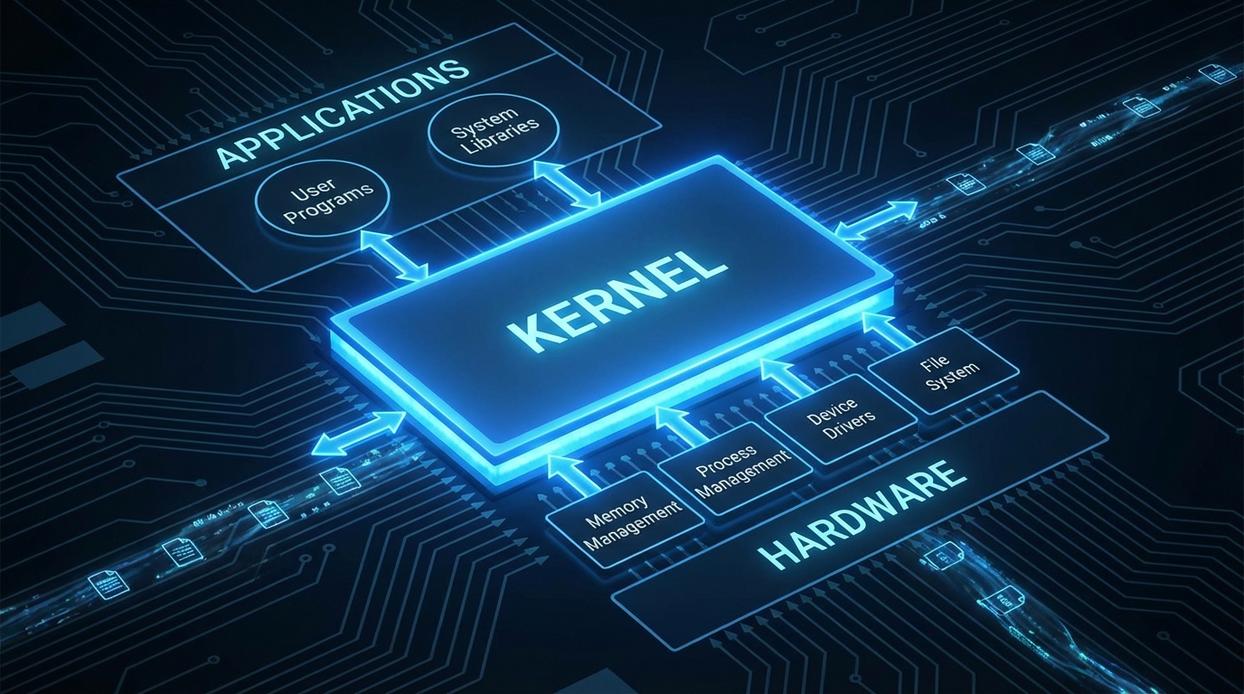
The first time a game hard-crashed on my Linux desktop, I braced for disaster. On Windows years ago, a bad driver once froze everything. But this time? The game vanished. My music kept playing. My browser tabs survived. That’s the power of separation.
In simple terms, your system runs in two worlds:
- Kernel space – the core of the OS with unrestricted access to hardware (CPU, memory, GPU).
- User space – where applications like your games run, with limited, protected access.
This boundary is a foundational stability feature of modern operating systems (see: Love, Linux Kernel Development, 2010). Because user programs can’t directly poke hardware, a crash usually stays contained. It’s like keeping guests in the living room instead of handing them keys to the house (what could possibly go wrong?).
So how does a game get anything done? Through system calls (syscalls)—the official gateway. A syscall is a controlled request such as “read this file” or “send this frame to the GPU.” The kernel validates and executes it securely.
A huge part of Proton’s magic is translating Windows API calls into Linux-native syscalls the kernel understands. If you’ve ever searched for linux kernel architecture explained, this translation layer is where theory meets real-world gaming performance.
How Kernel Architecture Directly Impacts Your Frame Rate
Most gamers blame GPU drivers when frames dip. Fair. But your kernel quietly decides whether your system feels BUTTERY SMOOTH or frustratingly inconsistent. Understanding linux kernel architecture explained helps connect the dots between background processes and the FPS counter.
1. The CPU Scheduler’s Role in Smoothness
The CPU scheduler is the kernel component that decides which process runs next and for how long. If your browser, Discord, and updater compete with your game, poor scheduling creates micro-stutters (those tiny hiccups you feel but can’t always see).
A gaming-optimized scheduler prioritizes latency-sensitive tasks. That means your game thread gets consistent CPU time instead of being preempted mid-frame. Some argue modern CPUs are powerful enough that scheduling barely matters. In light workloads, maybe. Under heavy multitasking? It absolutely does.
2. I/O Schedulers and Load Times
An I/O scheduler determines the order of read/write requests to storage. When launching a large open-world title, thousands of asset requests hit your SSD at once.
Schedulers like BFQ (Budget Fair Queueing) prioritize interactive tasks, while Kyber focuses on low-latency storage. The result: faster level loads and fewer streaming hitches. Pro tip: NVMe users still benefit from proper queue tuning.
3. Interrupts and Input Lag
Every mouse click generates a hardware interrupt—a signal demanding CPU attention. Efficient interrupt handling and high polling rates reduce input latency. Poor handling increases delay (yes, even a few milliseconds matter in competitive shooters).
4. Memory Management for Large Textures
When high-resolution texture packs exceed VRAM, the kernel manages paging between RAM and storage. Smart memory handling prevents massive performance cliffs instead of sudden FPS drops.
For display server considerations, see wayland vs x11 a technical comparison for power users: https://pblinuxgaming.com.co/wayland-vs-x11-a-technical-comparison-for-power-users/
Optimization stops being theory when you hear your fans WHIRRING and see CPU bars spike in htop. Tools like htop and iotop stream kernel activity, letting you spot whether slowdown feels like molasses (disk I/O) or a frantic heartbeat (CPU saturation). Some argue stock kernels are “good enough.” Fair. But custom kernels like XanMod or Liquorix tweak schedulers and timer frequencies for smoother desktop and gaming responsiveness. You can feel input lag tighten.
Not ready to switch?
- Adjust boot parameters for tuning
- Study linux kernel architecture explained to guide changes
Pro tip: change one variable at a time.
From Kernel Code to Higher Frame Rates
First, remember this: linux kernel architecture explained is the bridge between hardware and game. The scheduler (which decides what runs when), memory management (how RAM is allocated), and drivers (hardware translators) affect FPS. Therefore, understanding them helps you troubleshoot stutter and choose optimizations.
Mastering Linux Gaming Performance Starts Here
You came here to get linux kernel architecture explained in a way that actually makes sense for gaming performance — not just theory, but how it impacts your FPS, stability, and Proton compatibility. Now you understand how the kernel manages processes, memory, drivers, and hardware communication — and why those layers directly affect stutter, input latency, and system responsiveness.
The frustration with inconsistent performance, random crashes, or games that “should run fine” but don’t often comes down to what’s happening at the kernel level. When you understand that foundation, you stop guessing and start optimizing with purpose.
Here’s your next move: apply what you’ve learned. Audit your current kernel version, test performance-focused builds, fine-tune scheduler settings, and optimize driver configurations. Small, informed tweaks can deliver noticeable gains.
If you’re serious about smoother gameplay, better Proton compatibility, and squeezing every ounce of power from your Linux system, dive deeper into advanced optimization guides and performance breakdowns. Thousands of Linux gamers rely on proven, open-source tuning strategies to level up their rigs.
Stop leaving performance on the table. Start optimizing today and turn your Linux setup into a gaming machine that runs exactly how it should.